TypeScript 101
Hey, you made it to the blog, awesome!
I'm sure you already know what TypeScript is, or at least you've heard about this language at some point. I had heard about it too, a lot, but I wasn't clear on some concepts, so I'm writing the blog I wish I'd read about the basics of TypeScript. As a wise person once said: let's start at the beginning!
TypeScript, in simple words, is an improved and more advanced version of JavaScript. That's because it's a superset of JavaScript: it adds extra features on top, some of them being:
- Static typing
- Data types
- Interfaces
- Typed arguments
- Function return types
- And much, much more… (I'll talk about it in future posts)
It was created by Microsoft in 2012 and released as an open source project. Since then its popularity has kept growing, and for good reasons: it was created with the main goal of making life easier for us programmers, improving productivity and code quality. Thanks to its features we can write more readable, reliable and maintainable code, since we catch errors the moment we write them, thanks to static typing.
Another reason it became so popular is that JavaScript was already popular, and TypeScript gives us the advantage of using all the tools and libraries that already exist in JavaScript.
But enough talk, let's look at an example of why TypeScript boosts programmer productivity 🧑💻
Practice
Let's imagine we're building a calculator for our phone and we need a function to add numbers. If we did it with JavaScript, it would look like this:
function sumTwoNumbers(a, b) {
    return a + b;
}

sumTwoNumbers(1, 3) // Return -> 4
Great 🙌, we have a function for our calculator. If we pass it 1 and 3 it returns 4, works exactly as we imagined! Or does it?…
But what if a user decides to pass it things that aren't numbers? What would happen if they passed "Hello" and " World"? The function is called sumTwoNumbers 🤔
function sumTwoNumbers(a, b) {
    return a + b;
}

sumTwoNumbers("Hello", " World") // Return -> "Hello World"
If the function is called sumTwoNumbers, it makes no sense to pass it two strings, right? Well, JavaScript can't validate that while we're developing. This is where TypeScript comes into action.
If we wanted the same function in TypeScript, with data validation, it would look like this:
function sumTwoNumbers(a: number, b: number): number {
    return a + b;
}
Very similar, but we start seeing some differences, right? Notice that next to the parameters we're adding a colon : and number. This, my friends, is static typing. It's a tiny bit more code, and you might ask, what's that extra bit of code for?
Well, it's for this:

Notice that here we're trying to pass "Hello World" again and we get an error: it tells us we can't call the function because it explicitly expects two parameters of type number. Fine, let's change the types so we get our "hello world":

Uh oh, what did we do wrong? 👎
Well, if we look closely, after the last parenthesis there's another colon: in TypeScript we can also explicitly declare the return type of a function. In this case we're telling it the function returns a number, but adding two strings gives us another string.
With TypeScript we write a little more code than with JavaScript, but that extra bit helps us enormously to catch the kind of errors we saw in the gifs, errors we often make and only notice when it's already too late.
These are the things that make TypeScript a great tool for developers: it keeps simple things like these from breaking. By telling TypeScript that both parameters are of type number and the result is also a number, we're being explicit about what we expect. When TypeScript detects that what we're passing won't produce that result, it raises the error during development, not once it's in production.

Where can I use TypeScript?
These days you can use TypeScript anywhere you can use JavaScript. Some libraries and frameworks were built with TypeScript, and with TypeScript in mind, for example:
- Nest.js: Nest.js gives you a clear structure and a set of tools to build web/backend applications with TypeScript more efficiently and easily.
- Angular: Angular is a very famous frontend framework, developed by Google, that makes heavy use of TypeScript.
In other cases you'll have to integrate TypeScript more manually, but I'm sure you'll find a thousand guides for your framework of choice, since the community has taken care of writing type definitions for these frameworks and libraries.
For example, the "de facto" Node.js framework, Express, wasn't built with TypeScript, unlike Nest.js, which was. But not being written in TypeScript doesn't mean we can't use it with TypeScript.
To use Express with TypeScript we could do the following:
1. Install the required dependencies
npm install express
npm install typescript ts-node @types/express -D
If you've developed with Node.js before, some packages may look familiar, but if you're new to TypeScript two of them might not be: ts-node and @types/express.
- ts-node: a tool that lets us run TypeScript code directly on Node.js without compiling it. Very handy for development, but keep in mind it's not recommended for real environments and production, since it uses a lot of memory compiling code on the fly (below I'll show you how to compile the code for production).
- @types/express: this package provides the type definitions for Express. This pattern is very common for libraries that weren't built with TypeScript; often your code editor itself suggests installing these packages so you can get typing for libraries that weren't written in TypeScript.
2. Create a tsconfig.json file
In this file we configure how TypeScript files get compiled to JavaScript:
{
  "compilerOptions": {
    "module": "commonjs",
    "target": "es6",
    "outDir": "./dist",
    "esModuleInterop": true
  },
  "include": [
    "./src/**/*"
  ],
  "exclude": [
    "node_modules"
  ]
}
You can configure many things in this file, but here we're only using a few properties:
- module: the module system used for compilation, in this case CommonJS.
- target: the JavaScript version the code compiles down to, in this case ES6.
- outDir: the folder where the compiled code goes, in this case
./dist. - esModuleInterop: controls how modules are imported and exported. When set to
true, it lets modules declared withexport =be imported withimport ... from ...instead of having to use a default import.
Those are the compilerOptions 🤓, but there are two more properties: include, which specifies the files taken into account for compilation (here, everything inside src), and exclude, which is used to exclude 🤓 (here, everything in node_modules).
3. Create an app.ts file inside a src folder
Here we start writing our application with all the advantages of TypeScript:
import express, { Request, Response } from 'express';

const app = express();

app.get('/', (req: Request, res: Response) => {
  res.send('Hello, World!');
});

app.listen(3000, () => {
  console.log('Server is listening on port 3000');
});
Notice that besides express we're importing { Request, Response } and assigning them as the parameter types. They're not primitive types, that is, res isn't a number or a string, it's of type Response. These more complex types can be created through interfaces or classes; in this case Request and Response are interfaces the library provides. The advantage of using TypeScript with frameworks like Express, which weren't created with TypeScript, is that we get much more clarity about what we can do with each part of the code, since we can easily see which methods each kind of variable gives us access to.
For example:
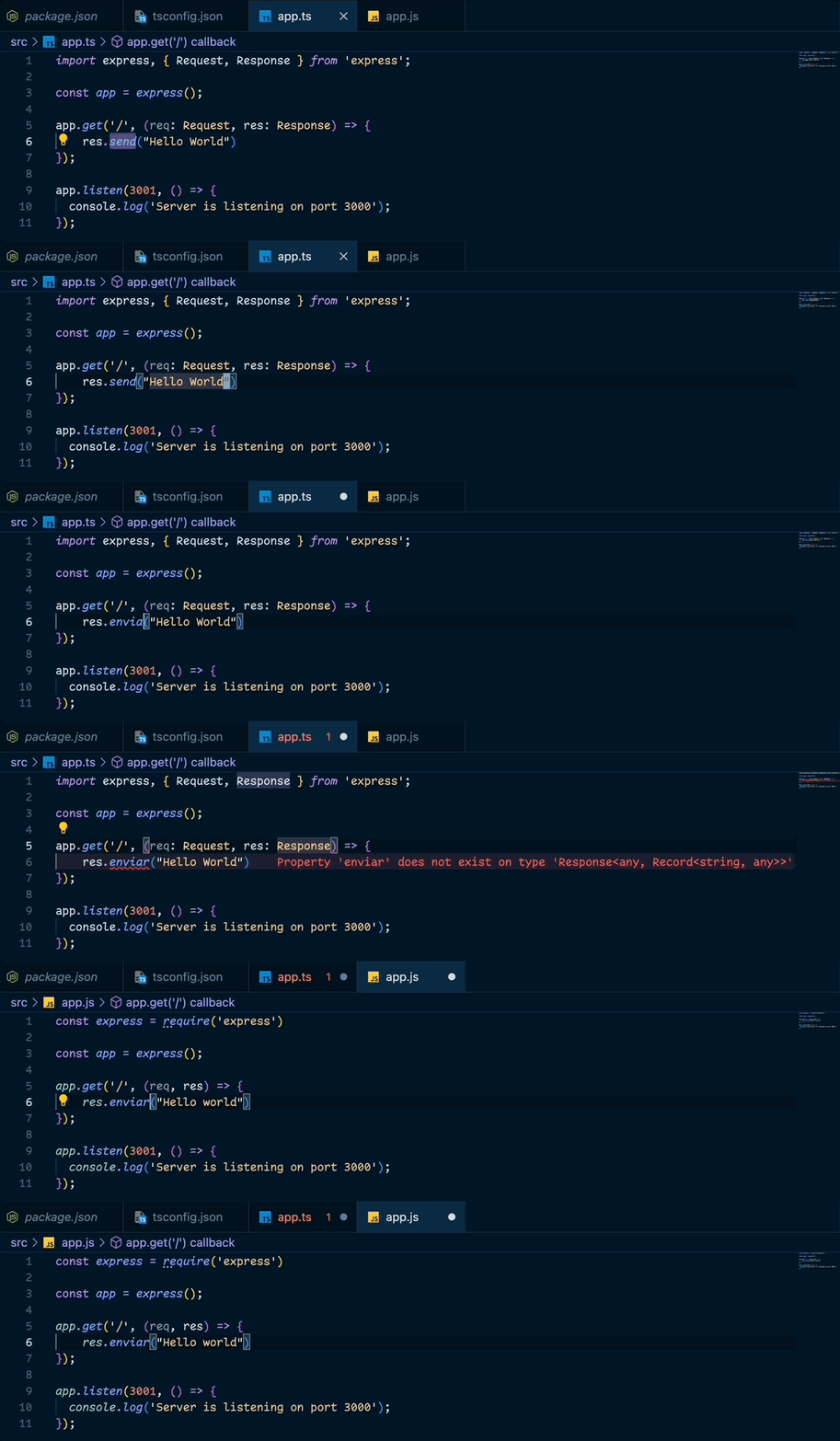
Here we have one server written in TS and another in JS. Notice that the TS version tells us enviar is not a property of Response and flags an error, something that doesn't happen in the JS version. 🤯
4. Run it with TypeScript
npx ts-node app.ts
5. Compile the code to JS
Since we're using Node.js, we need to compile our code to JavaScript (there are other runtimes where this isn't necessary, but in Node it is). To compile it we just add the following script to package.json:
{
  "scripts": {
    "build": "npx tsc"
  }
}
That reads the configuration we wrote in tsconfig.json and compiles the code. If we look at our files, we'll notice the dist folder now has the compiled files. Now we can run it natively with Node, without ts-node, simply with:
node dist/app.js
You can run it in pure JS 🚀
I hope you liked this blog. I'll keep posting more TypeScript things, so stay tuned 👀